
A good travel photo is only half the job. You may also want to edit it, add a location, post it at the right time, and send the original to friends without losing quality. Instagram can handle that workflow on a Huawei phone, but a little preparation makes the experience more reliable when networks, storage, and regional features change.
Use the Official Installation Route
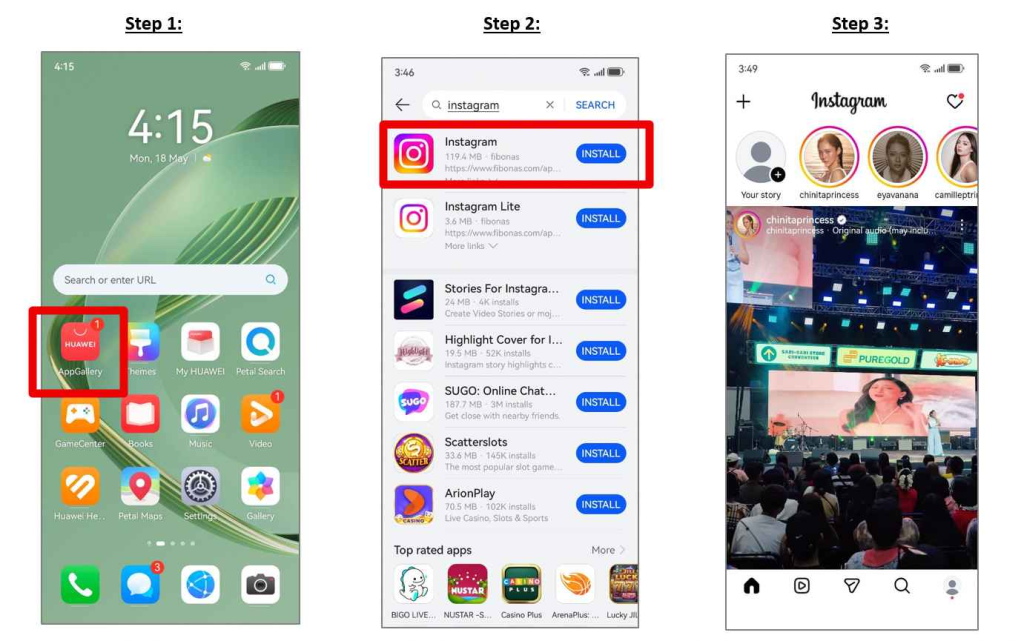
Start in HUAWEI AppGallery and search for Instagram. Verify the listing before installing it. The Huawei Community walkthrough for huawei instagram explains this basic route and advises users to return to AppGallery for future updates.
Using one installation source reduces confusion when a new version arrives. If the app is unavailable in your current catalogue, check the HUAWEI ID region and install pending AppGallery or system updates rather than downloading the first APK you find online.
Set Up a Better Photo Workflow
Before a trip, give Instagram access to the photos you intend to share and test the camera inside the app. For the best quality, take important photos with the phone’s main camera first, edit them in the Gallery, and upload the finished version. This gives you more control over cropping, colour, and the original file.
Huawei Instagram can also be used as the final step in a wider local-app workflow. Maps help you find the location, transport apps get you there, and Instagram lets you save or share the experience. Add locations carefully and avoid posting a precise hotel or home address while you are still there.
Manage Reels, Data, and Storage
Reels and Stories use more data than text or still images. Turn off unnecessary autoplay options, upload on Wi-Fi when possible, and keep enough storage for drafts. Long videos may fail if the connection changes during upload, so save the edited file before posting.
When using a local SIM, confirm that Instagram has mobile-data permission. If uploads stop in the background, review battery management and App launch settings. Do not remove all restrictions blindly; allow only the access required for your normal posting routine.
Stay Secure While Abroad
Use a unique password and enable the account security features available to you. Be cautious with login links sent through direct messages, even when they appear to come from a friend. A compromised account can expose private conversations, archived Stories, and connected business pages.
If a login warning appears after changing countries or SIM cards, check the device and location details before approving it. Keep recovery email and phone information current.
A Practical Publishing Routine
Install and update from the official store, prepare media before opening Instagram, post over a reliable connection, and keep original files outside the app. That sequence is faster than rebuilding a Reel after a failed upload.
The huawei instagram guide provides the Huawei-specific starting point. Once the app is installed correctly, careful data use, media preparation, and privacy settings make it much more useful for travel and everyday local discovery.